Release Notes
20.0.1.0.0 - 15 Oct 2026
Summary: German Documents is now available for Odoo 20, with the same DIN 5008 documents you know from Odoo 19 and more reliable PDF printing.
New Features 🎉
Your invoices, quotations, sale orders, purchase orders, requests for quotation, purchase requisitions and delivery slips print in the familiar much. DIN 5008 layout on Odoo 20, with the same look as on Odoo 19.
But Also...
Improvements :🔬
- Printing several documents at once is now much more reliable. A stuck print no longer freezes the whole system; it simply fails on its own.
Bug Fixes 🔨
- Unit prices on sale orders show their currency again.
- Sale orders no longer show an extra delivery-date row or a second "#" numbering column next to Pos.
- Delivery slips show the unit (e.g. "Units", "kg") next to the quantities again, for every user.
- On invoices, the VAT block is now removed where intended.
- Documents no longer fail to print when a report reference cannot be found.
18.0.1.3.1 - 03 Sep 2026
Summary: This release fixes a crash in the Studio report editor when opening documents that use the DIN 5008 layout, so you can customise those reports again without any change to the printed output.
Bug Fixes 🔨
- Opening a DIN 5008 report (quotations, invoices, purchase orders, delivery slips, and so on) in the Studio report editor no longer fails with an error. The editor previously broke on the sender/recipient address block of the DIN 5008 layout. Your printed and emailed PDFs look exactly the same as before; only the editor experience is fixed.
💡
Question or feedback on this release? Reach out to product@erp.muchconsulting.de 🚀
19.0.1.4.1 - 03 Sep 2026
Summary: This release corrects the Tax ID shown in the footer of invoices that use a foreign fiscal position, and makes DIN5008-based reports editable again in Studio.
Bug Fixes 🔨
- Invoices now show the right Tax ID in the footer. When an invoice uses a fiscal position that carries its own foreign Tax ID (for example a foreign VAT registration), the DIN5008 footer prints that Tax ID instead of your company's default one. The label next to it now follows your company's country setting instead of always reading "VAT ID". Quotations, sales orders and purchase documents keep showing the company Tax ID as before.
- Studio can open DIN5008 report layouts again. Opening an invoice, order or delivery report in the Studio report editor no longer fails with an error. Printed documents look exactly the same as before.
- Creating an invoice from a sales order no longer fails on databases where the Account part of the QWeb Updater is installed without the Sales part.
💡
Question or feedback on this release? Reach out to product@erp.muchconsulting.de 🚀
19.0.1.4.0 - 24 Jun 2026
Summary: This release fixes how your DIN5008 PDF documents handle long product descriptions across page breaks, keeps header texts in sync across quotations, sales orders and invoices, restores the document address on the delivery slip, and corrects the language of inter-company invoices.
Bug Fixes 🔨
- Multi-page documents now print cleanly: when a product description was long enough to run onto a second page, the column titles could overlap the text and cut it off. Documents now break long descriptions neatly across pages so the column headers repeat properly on every page, and very long codes or links no longer push the table off the edge. A new "Optimize Multi-page Tables" company setting lets you turn this on when needed (it is off by default).
- Header texts now stay in sync: the introductory text you set on a quotation now carries over to the sales order and onward to the invoice when you have not configured a default text, while any configured default still takes priority. Clearing a default text in the editor is now correctly understood as "no default".
- Delivery slip address restored: the document address was showing in the wrong place on the delivery slip and is now back in the correct address block, matching the sales order and invoice layout.
- Inter-company invoices in the right language: when an invoice was created automatically between your companies, its terms-and-conditions text could appear in English even though the original was in German. The correct language is now carried over to the inter-company invoice, and the period label on the invoice is now translatable.
💡
Question or feedback on this release? Reach out to product@erp.muchconsulting.de 🚀
18.0.1.3.0 - 24 Jun 2026
Summary: This release fixes how your DIN5008 PDF documents handle long product descriptions across page breaks, keeps header texts in sync across quotations, sales orders and invoices, and restores the document address on the delivery slip.
Bug Fixes 🔨
- Multi-page documents now print cleanly: when a product description was long enough to run onto a second page, the column titles could overlap the text and cut it off. Documents now break long descriptions neatly across pages so the column headers repeat properly on every page, and very long codes or links no longer push the table off the edge. A new "Optimize Multi-page Tables" company setting lets you turn this on when needed (it is off by default), and it also applies to purchase RFQ and requisition documents.
- Header texts now stay in sync: the introductory text you set on a quotation now carries over to the sales order and onward to the invoice when you have not configured a default text, while any configured default still takes priority. Clearing a default text in the editor is now correctly understood as "no default".
- Delivery slip address restored: the document address was showing in the wrong place on the delivery slip and is now back in the correct address block, matching the sales order and invoice layout.
💡
Question or feedback on this release? Reach out to product@erp.muchconsulting.de 🚀
17.0.1.3.0 - 24 Jun 2026
Summary: This release fixes how your DIN5008 PDF documents handle long product descriptions across page breaks and makes header texts flow consistently from quotation to sales order to invoice.
Bug Fixes 🔨
- Multi-page documents now print cleanly: when a product description was long enough to run onto a second page, the column titles could overlap the text and cut it off. Documents now break long descriptions neatly across pages so the column headers repeat properly on every page, and very long codes or links no longer push the table off the edge. A new "Optimize Multi-page Tables" company setting lets you turn this on when needed (it is off by default), and it also applies to purchase RFQ and requisition documents.
- Header texts now stay in sync: the introductory text you set on a quotation now carries over to the sales order and onward to the invoice when you have not configured a default text, while any configured default still takes priority. Clearing a default text in the editor is now correctly understood as "no default".
💡
Question or feedback on this release? Reach out to product@erp.muchconsulting.de 🚀
19.0.1.3.0 - 18 May 2026
Summary: Delivery period dates now carry over automatically to intercompany vendor bills, and the shipping date on delivery slips shows a proper leading zero.
New Features 🎉
- Delivery dates synced across intercompany invoices
When an invoice between two of your companies is created, the delivery period (start and end dates) you entered on the customer invoice is now copied automatically onto the matching vendor bill in the other company — both for the whole document and for each individual line. You no longer have to re-enter these dates by hand, and the bill will no longer fall back to today's date when no period was set.
Bug Fixes 🔨
- The shipping date on the delivery slip (DIN 5008) now always shows a leading zero on single-digit days — for example "05.05.2026" instead of "5.05.2026" — and follows your locale's date format consistently, matching how dates already appear on invoices.
💡
Question or feedback on this release? Reach out to product@erp.muchconsulting.de 🚀
18.0.1.2.0 - 18 May 2026
Summary: Delivery dates now carry over correctly when intercompany bills are created automatically, and delivery slip dates display with a proper leading zero.
New Features 🎉
- Delivery dates on intercompany documents
When a customer invoice automatically generates the matching vendor bill in the other company, the delivery date period now carries over exactly as entered — including different delivery dates set on individual lines. Previously these dates could be lost or replaced with today's date.
Bug Fixes 🔨
- Delivery slips (DIN 5008) now show the shipping date with a leading zero on single-digit days (e.g. 05.05.2026 instead of 5.05.2026), matching the date style used on invoices (#53599).
💡
Question or feedback on this release? Reach out to product@erp.muchconsulting.de 🚀
17.0.1.2.0 - 18 May 2026
Summary: This release adds Incoterm printing on German invoices, keeps delivery periods in sync between intercompany invoices and bills, and fixes a few invoice layout and export issues.
New Features 🎉
- Incoterm on invoices
You can now show the Incoterm on your accounting documents. Enable the new "Print Incoterm" option in the company settings, and the document header will display the Incoterm (and its location, when set).
- Delivery periods synced between companies
When an intercompany invoice automatically creates a vendor bill, the delivery period (start and end dates), including the per-line delivery windows, is now copied over so both documents show the same period.
Bug Fixes 🔨
- The "This invoice covers the following period:" text on the invoice no longer sticks to the date — the spacing is now correct.
- Fixed an error in the purchase DATEV export caused by a renamed supplier identifier field, so the export works again.
- Corrected the VAT section on invoices that are regenerated as a new revision, so the VAT information is displayed properly.
💡
Question or feedback on this release? Reach out to product@erp.muchconsulting.de 🚀
19.0.1.2.1 - 17 Apr 2026
Summary: This release adds configurable visibility toggles for purchase order and RFQ report fields, giving users control over which information appears on printed documents.
New Features 🎉
- Purchase Report Field Visibility Settings
Four new toggle options are now available in Settings > Purchase to control what is printed on Purchase Orders and Requests for Quotation:
- Print Order Deadline — show or hide the order deadline on reports
- Print Payment Terms — show or hide payment terms on reports
- Print Taxes — show or hide tax details on reports
- Print Line Arrivals — show or hide per-line delivery dates on reports
💡
Question or feedback on this release? Reach out to product@erp.muchconsulting.de 🚀
19.0.1.1.1 - 13 Apr 2026
Summary: This release fixes several invoice PDF layout and rendering issues, improving position numbering, section row alignment, and report generation reliability.
Bug Fixes 🔨
- Fixed invoice position numbering: sections and notes no longer incorrectly increment the position counter — only actual product lines are numbered
- Fixed invoice section row alignment: section rows now span the correct number of columns, including when discount or tax columns are visible
- Fixed PDF report generation: reports no longer fail with an error when the calling context references a different model than the report's target model.
💡
Question or feedback on this release? Reach out to product@erp.muchconsulting.de 🚀
18.0.1.1.1 - 31 Mar 2026
Summary: Patch release fixing report model resolution in the QWeb Updater to prevent errors when printing reports from different contexts.
Bug Fixes 🔨
- Fixed a bug where printing a report from a context with a different active model (e.g. printing an invoice report from a sale order) could cause an error.
💡
Question or feedback on this release? Reach out to product@erp.muchconsulting.de 🚀
19.0.1.1.0 - 4 Mar 2026
Summary: This release introduces the ability to print incoterms on invoices and credit notes, resolves an issue with VAT display logic, and improves portal access.
New Features 🎉
- Print incoterm on invoices and credit notes
This feature adds the functionality to print incoterm details on invoices and credit notes.
- Resolve user values for portal access
This feature resolves user values to use the underlying partner for portal access, improving security and data consistency.
Improvements 🔬
- No specific improvements in this release.
Bug Fixes 🔨
- Fixed a bug where VAT was dupliacted on documents.
- Fixed a bug related to spacing in delivery timeframes for German documents.
- Fixed a bug by adjusting a validation error message to be more informative.
- Fixed a bug where portal view for internal users was displaying an error.
18.0.1.1.0 - 4 Mar 2026
Summary: This release introduces the ability to print incoterms on documents. It also includes an improvement to the VAT display logic and a fix for delivery timeframes.
New Features 🎉
- Print Incoterm
This feature adds the ability to print the Incoterm on documents.
But Also...
Improvements 🔬
Prevent duplicated VAT printing due to Odoo revision.
Bug Fixes 🔨
Fixed a bug where delivery timeframes were not displayed correctly.
💡
Question or feedback on this release? Reach out to product@erp.muchconsulting.de 🚀
17.0.1.1.0 - 4 Mar 2026
Summary: This release introduces the ability to print incoterms on documents, and improves the display of VAT. It also includes a fix for delivery timeframes.
New Features 🎉
- Print Incoterm
This feature adds the ability to print the Incoterm on documents.
But Also...
Improvements 🔬
This is now improved by using the new datev field for purchase documents and handling VAT display in new revisions.
Bug Fixes 🔨
Fixed a bug where delivery timeframes were not displayed correctly.
💡
Question or feedback on this release? Reach out to product@erp.muchconsulting.de 🚀
19.0.1.0.2 - 27 Jan 2026
Summary: This release introduces a new feature for inventory management and fixes a bug related to PDF generation.
New Features 🎉
- Cross-version xpath for move_line_ids
This feature improves the compatibility of the inventory module across different versions.
Bug Fixes 🔨
- Fixed a bug where the street was missing on PDFs.
💡
Question or feedback on this release? Reach out to product@erp.muchconsulting.de 🚀
18.0.1.0.15 - 27 Jan 2026
Summary: This release introduces a new feature for inventory management and fixes a bug related to PDF generation.
New Features 🎉
- Cross-version xpath for move_line_ids
This feature improves the compatibility of the inventory module across different versions.
Bug Fixes 🔨
- Fixed a bug where the street was missing on PDFs.
💡
Question or feedback on this release? Reach out to product@erp.muchconsulting.de 🚀
19.0.1.0.1 - 23 Dec 2025
Summary: This release focuses on fixing minor bugs
Bug Fixes 🔨
- Company and contact names are now separated in addresses for better clarity and organization.
- Fixed a bug where German translations were missing in the account updater.
💡
Question or feedback on this release? Reach out to product@erp.muchconsulting.de 🚀
18.0.1.0.14 - 23 Dec 2025
Summary: This release focuses on fixing minor bugs
Bug Fixes 🔨
- Company and contact names are now separated in addresses for better clarity and organization.
- Fixed a bug where German translations were missing in the account updater.
💡
Question or feedback on this release? Reach out to product@erp.muchconsulting.de 🚀
19.0.1.0.0 - November 17, 2025
Summary : upgrade to Odoo 19
The module is now available for Odoo 19!
💡
Question or feedback on this release? Reach out to product@erp.muchconsulting.de 🚀
18.0.1.0.13 - November 17, 2025
Summary: This release fixes an issue with manual entries in report headers.
Bug Fixes 🔨
💡
Question or feedback on this release? Reach out to product@erp.muchconsulting.de 🚀
18.0.1.0.12 - 29 Oct 2025
Summary: Bug fix preventing sending PDF via email
Bug Fixes 🔨
- Fixed a bug occurring when clicking the Send by Email action on records.
18.0.1.0.10 - 14 Oct 2025
Summary: Bug fix release focused on improving QWeb report display formatting and address handling.
Bug Fixes 🔨
- Fixed a bug where shipping address display format was inconsistent in QWeb reports
- Fixed VAT display handling issues in the new invoice revision format
- Fixed missing display_name field causing incorrect name display in reports
- Fixed missing table-borderless CSS class in external layout template affecting report styling
18.0.1.0.0 - 26 Nov 2024
Summary: Upgrade to O18
- German documents (Qweb Updater) is now available for Odoo 18
17.0.1.0.4 - 19 Nov 2024
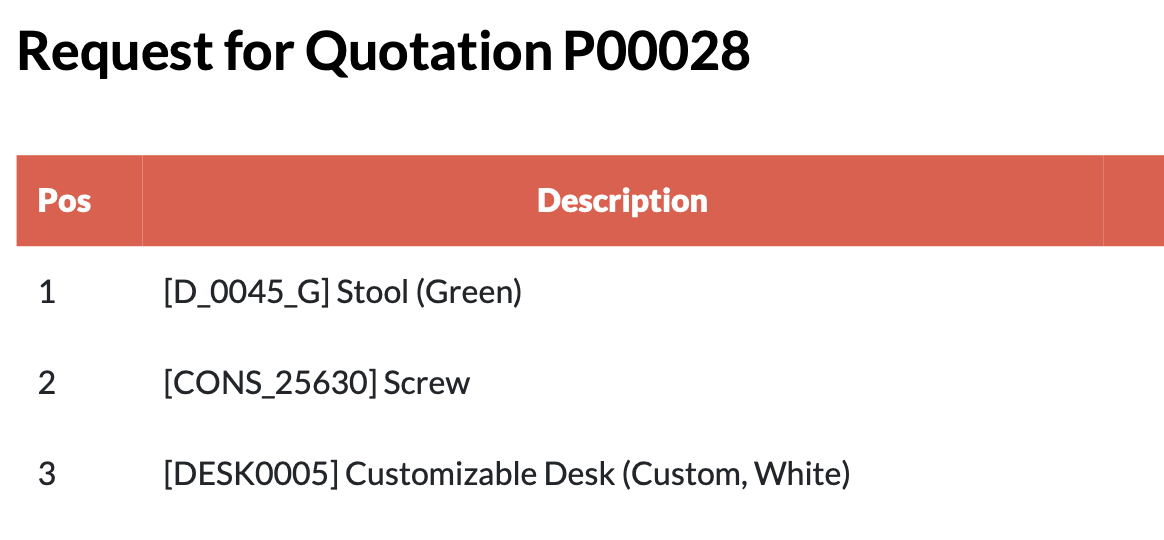
Summary: Removed duplicated RFQ title.
Fixes 🔨
- Fixed the layout of Request for Quotation templates to remove the duplicate title.
Before

After
17.0.1.0.3 - 4 Nov 2024
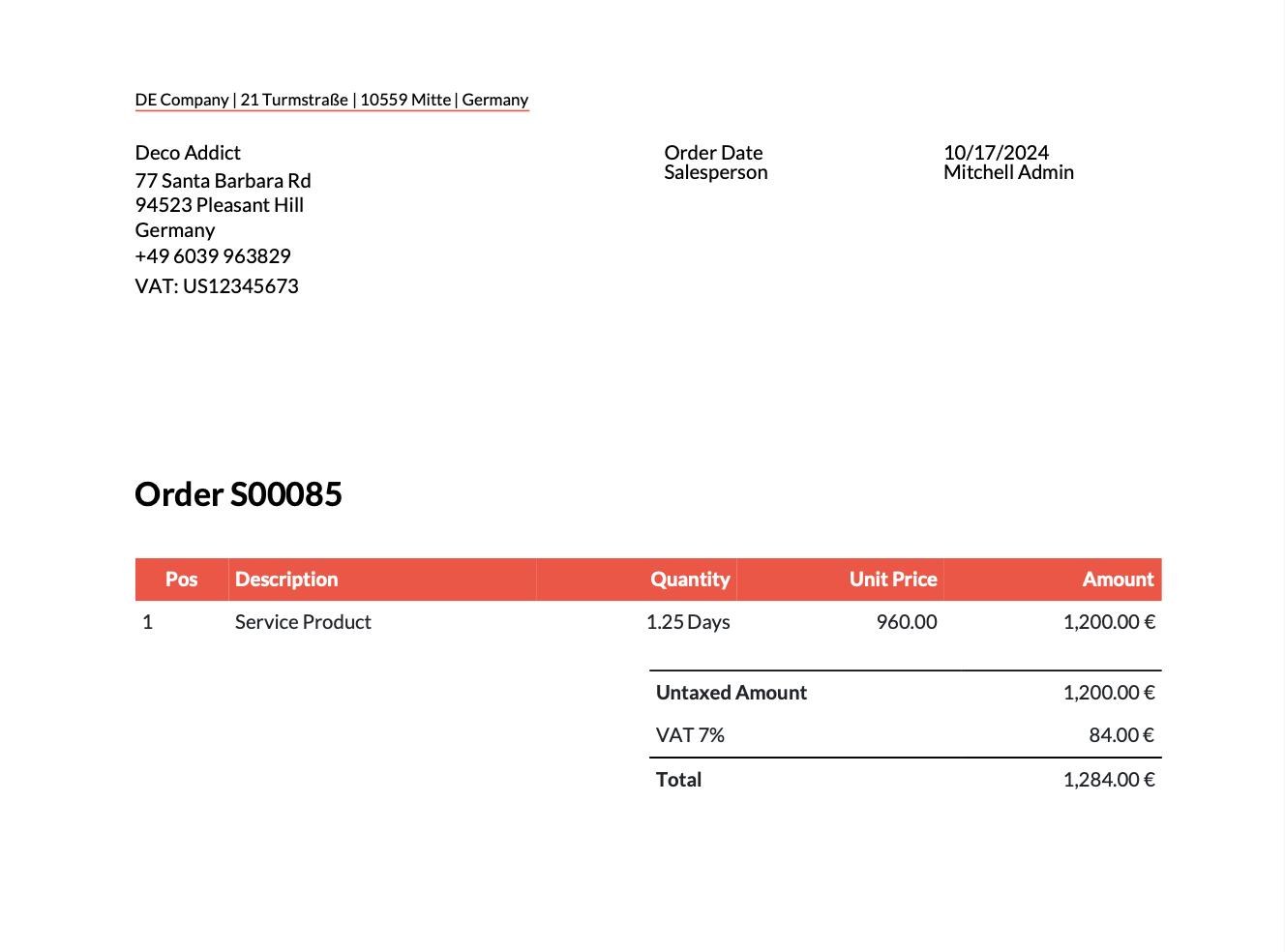
Summary: Fixed issue with Sign app, remove duplicate sales order header
Fixes 🔨
- Fixed a conflict with the Sign app preventing users from saving signed documents.
- Fixed the layout of Sales Order templates to remove the duplicate header.
After
💡
Question or feedback on this release? Reach out to product@erp.muchconsulting.de 🚀
17.0.1.0.2 - 20th of September, 2024
Summary: Migration scripts.
Improvements 🔬
-
Added migration scripts to support upgrading from German documents version < 17.0.1.0.0 to version > 17.0.1.0.0
17.0.1.0.1 - 12th of September, 2024
Summary: Support for Odoo revision
Improvements 🔬
-
Update of the much_qweb_updater_purchase_requisitions needed because of an Odoo revision