Onboarding Guide — muchdoo, Timesheets & Internal Operations
This article covers the day-to-day operational essentials every new much. Consulting team member needs to know: internal HR policies, how to log and describe timesheets correctly, and how to use the project management tools in muchdoo.
Scope: Covers HR processes (travel, approvals, time off, appraisals), timesheet standards and billing rules, and the key muchdoo modules you interact with daily (Projects, Sales, CRM, Knowledge, Superset). Does not cover Shoovels operations, sprint workflows, or ticket writing — those are in the Shoovels & Technical Best Practices article.
📋 Overview: What This Article Covers
| Topic | Where in muchdoo | Key rule |
|---|---|---|
| Business travel | TRAVEL PERK app | Economy class; avoid personal car |
| Approvals | Approvals app | Submit request; >1,000 € needs manager pre-discussion |
| Time off & sick leave | Time Off app | Doctor's note mandatory from day 3 |
| Appraisals | Feedback app | Quarterly; raise requests go here, not in 1:1s |
| Timesheets | Timesheets app | Target: 5–7 billable hours/day; log at least twice daily |
| Budget & project health | Sales app → Sale Orders | Monitor delivered vs. invoiced quantities |
| KPIs & billable rate | Superset (BI tool) | Project managers use this for performance dashboards |
📍 Where to Find Your Tools
- muchdoo home screen — Your main dashboard. All apps listed below are accessible from the app launcher (grid icon, top right).
- Knowledge → How To Know → Consulting 2.0 — The internal knowledge base. Always search here before asking colleagues. It contains the most up to date best practices of our consulting work.
- TRAVEL PERK — The company travel booking portal. Accessible from the muchdoo app launcher.
- Approvals — Submit requests for training budgets, home office equipment, office exchanges, company car, and similar benefits.
- Time Off — Book vacation and register sick days.
- Feedback — Track appraisal meetings (quarterly cycle).
- Timesheets → My Timesheets — Log your daily work hours here.
- Project → Projects → [Customer Project] — Your project Kanban board with all ticket stages.
- Sales → Sale Orders → [Customer Order] — Budget health: delivered vs. invoiced hours.
- Superset — Internal BI dashboard for KPIs and billable rate tracking (primarily used by project managers).
⚙️ HR & Internal Policies
Business Travel
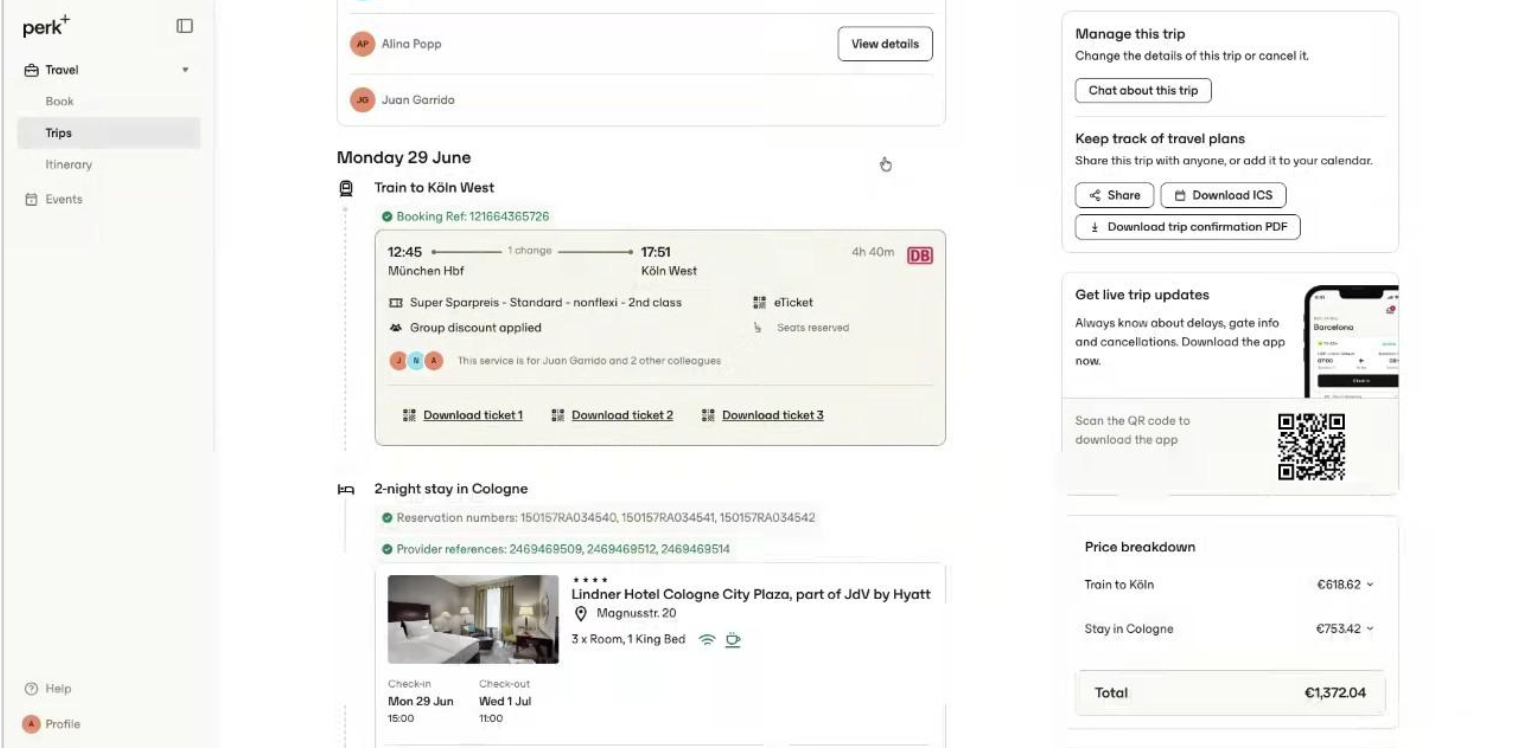
Business trips (on-site customer visits, key user training, go-live events) are booked through the TRAVEL PERK portal. One designated team member typically books for the whole group to consolidate flights, hotels, and trains.
- Company policy: economy class for all travel.
- Personal car travel is strongly discouraged — driving time counts as active work time and, combined with time at the customer site, may exceed the 10-hour daily limit and increase company liability.
- Using a personal car requires prior approval from your team lead. Treat it as a rare exception.
⚠️ Car travel liability: Driving time is considered billable work time. If combined with a full day on-site, you may exceed the legal 10-hour daily work limit. Always get approval before driving to a customer.
Approvals Application
Use the Approvals app for any request that requires company sign-off. Common request types:
| Request type | Key rules |
|---|---|
| Self-learning / training budget | Must be role-relevant. Budgets >1,000 € require prior manager discussion. |
| Home office equipment | Submit in Approvals with invoice; P&C processes after approval. |
| Office exchange (working from another office) | Submit 3 months in advance. Requires a valid business justification. |
| Company car / leasing | Available to full-time employees in DE after probation period. See Approvals for details. |
Time Off & Sick Leave
Vacation and sick days are managed in the Time Off app. Submit vacation requests directly there — no email needed.
- Sick leave up to 2 days: no doctor's note required.
- From day 3 onwards: a medical certificate (Krankschreibung) is mandatory and must cover the full duration of continuous illness from day 3.
- Upload the certificate or forward it to P&C as described in the company policy.
⚠️ Doctor's note rule: If you are sick for 3 or more consecutive days, the certificate must cover the entire continuous absence starting from day 3. Missing this can create compliance issues.
Feedback & Appraisals
Appraisal meetings happen quarterly and are tracked in the Feedback app. These are the correct forum for discussing:
- Performance and professional development
- Project satisfaction and workload concerns
- Salary discussions or raise requests
Raise these topics during formal appraisals — not in ad-hoc 1:1 conversations. This ensures they are properly tracked and followed up.
🔑 Timesheet Basics
Timesheets are the financial backbone of the business. Every billed hour must be correctly categorized and described. There are two billing types:
| Type | What counts as this | Target |
|---|---|---|
| Billable | All client work — configuration, testing, meetings, workshops, QA, documentation | 5–7 hours/day (long-term target once onboarding is complete) |
| Non-Billable | Onboarding, internal training, travel time, team stand-ups, internal meetings | Log accurately; do not skip |
In muchdoo, you can group your timesheets by Billing Type to get a quick overview of your billable vs. non-billable split. Set this as a personal filter in Timesheets → My Timesheets.
⚙️ How to Log Time Correctly
What to write in descriptions
Timesheet descriptions are visible to customers on invoices. Write them professionally — imagine the customer reading every entry.
| Avoid | Use instead |
|---|---|
| Bug fixing | Resolve issue: [brief description] |
| Research | Configuration analysis or Technical review |
| Using AI / Claudioo to check X | Configuration or Task-specific analysis |
| Stupid bug — 3 hours of debugging | Meeting with developer — reported issue from customer |
| Naming a specific colleague or customer employee | Describe the activity, not the person |
Rule of thumb: Be transparent but professional. Give the customer enough context to understand what was done — without giving them room to question it. Avoid any wording that could be read as "we were figuring things out at your expense."
When to log
- Log timesheets at least twice daily — before and after lunch. This avoids the Friday afternoon scramble of trying to remember what you did on Monday.
- Internal recurring activities (stand-ups, team communication) can be summarized periodically rather than logged entry-by-entry.
- Tasks linked to a ticket: always select the correct ticket in the task field.
Time thresholds for billing
- Tasks under 5–10 minutes are generally not billed as standalone entries.
- When multiple small tasks are done for the same customer in one day, consider grouping them into a single entry with a combined description.
- Any interaction that takes more than 10 minutes should be logged and linked to a task in the project.
🤖 Automated Timesheet Review with Claudioo
much. Consulting uses Claudioo (the AI assistant built into muchdoo) to assist with the end-of-month timesheet review. You do not need to do anything to activate this — it runs as part of the EoM process managed by your project lead.
What Claudioo does during EoM review:
- Flags entries with problematic descriptions (e.g. "research", "bug fixing", names of individuals)
- Identifies rounding issues (e.g. entries logged as 0:07 instead of rounding up or grouping)
- Highlights entries without a linked task or ticket
- Spots budget overruns and alerts the project lead
Tip: The cleaner your daily entries are, the less rework the EoM review generates. Claudioo saves the project lead time — it does not replace their judgment. Descriptions that pass automated review can still be edited manually before invoicing.
⚙️ Project Tools in muchdoo
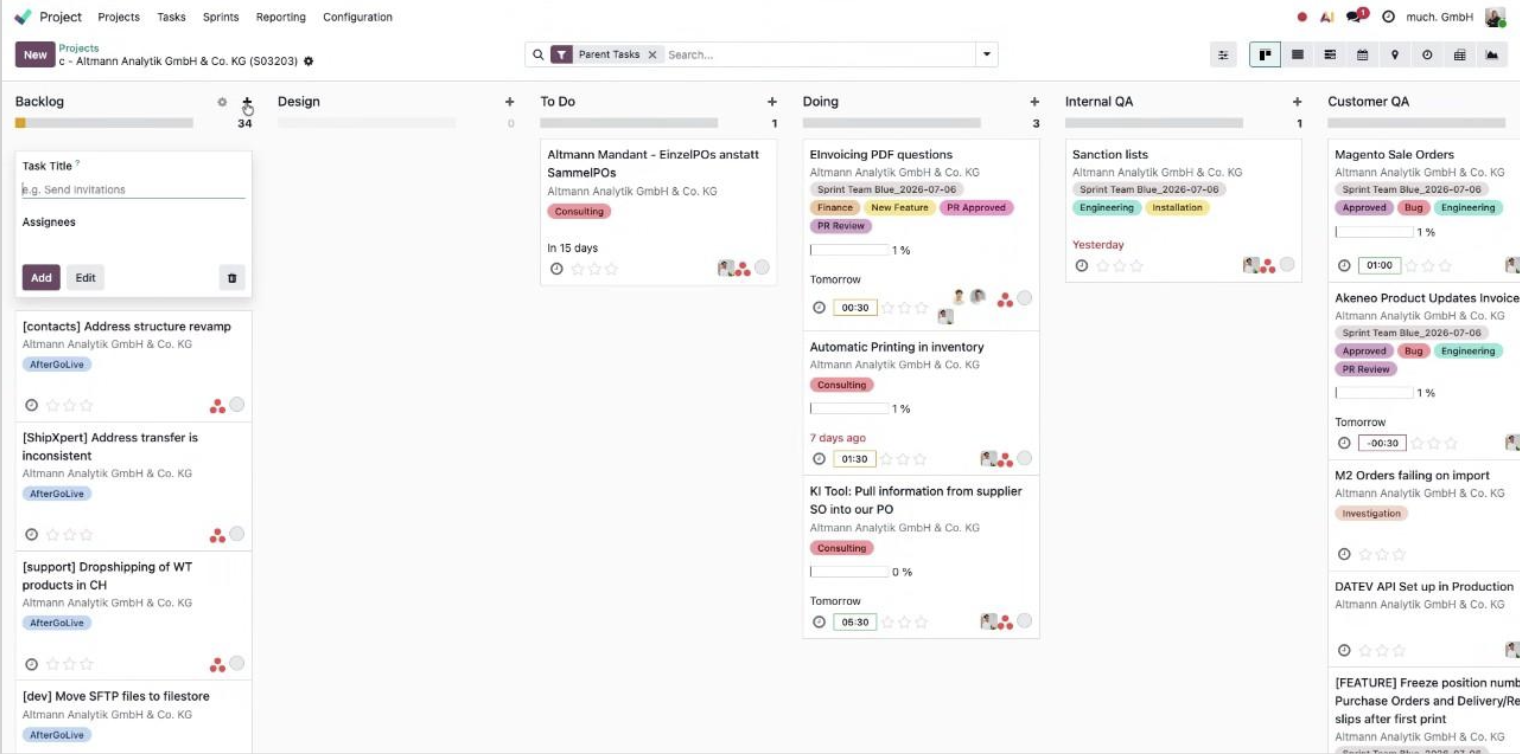
Projects Module — Task & Sprint Management
Navigate to Project → Projects → [Customer Project] to see the Kanban board for your project. Key things to do here:
- Create tasks for every client interaction or idea that takes more than 10 minutes.
- Link each task to the correct Sale Order line for accurate tracking.
- Assign tags (especially Engineering for dev tickets), deadlines, and assignees.
- Add tasks to the active sprint using the "Add to Sprint" button — only after the engineering estimation is confirmed.
- Use the star rating (priority) to signal urgency. Before adding an urgent ticket to a running sprint, consult the team lead.
Sales App — Budget Overview
The Sales app is where you monitor the financial health of your project. Navigate to Sales → Sale Orders → [Customer Order].
- Check the Delivered vs. Invoiced quantities on each line item.
- When delivered hours approach the ordered quantity, it is time to initiate an upsell conversation.
- As a new consultant, ask your team lead to walk you through creating the correct line items for an upsell on your first time.
- Also, as a new consultant, you probably won't have access to all projects. Remember, you get to see what you need to see :)
End of Month (EoM) Reporting
At the end of each month, the project lead produces an EoM report. As a consultant, your responsibility is to ensure your timesheets are complete, correctly described, and linked to the right tasks before the EoM review begins. The report covers:
- Planned vs. actual hours delivered
- Budget status and remaining budget
- Project blockers or risks
- Customer expectations for the coming month
CRM — Pre-Project Documentation
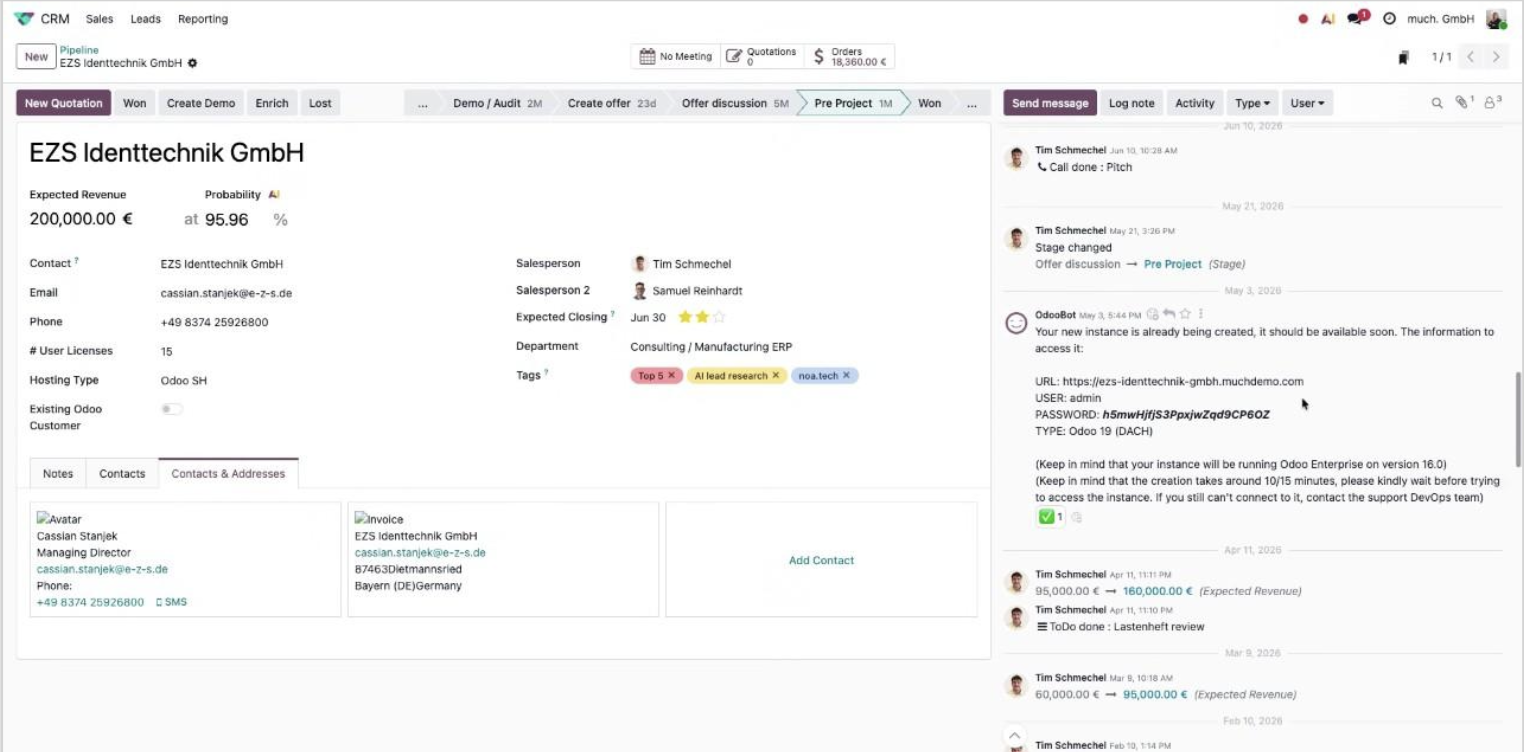
The CRM module is primarily used during pre-project phases. For active implementation projects, the most useful thing you will find in CRM is the chatter notes added by Solutions — including:
- Demo database URL and login credentials
- Instance connection details
- Early customer context from the pre-project phase
Save all database credentials and instance details you find in 1Password immediately — this avoids repeated trips to CRM to look up the same information.
Knowledge Base
Navigate to Knowledge → How To Know → Consulting 2.0 for internal procedural articles. The knowledge base is the first place to check when you have a question about a process, tool, or policy. Searching here first reduces the time colleagues spend answering repetitive questions.
Search before asking: Most process questions are already documented. Use the search bar in Knowledge with 2–3 keywords before pinging a colleague in Slack.
Superset — Performance Dashboards
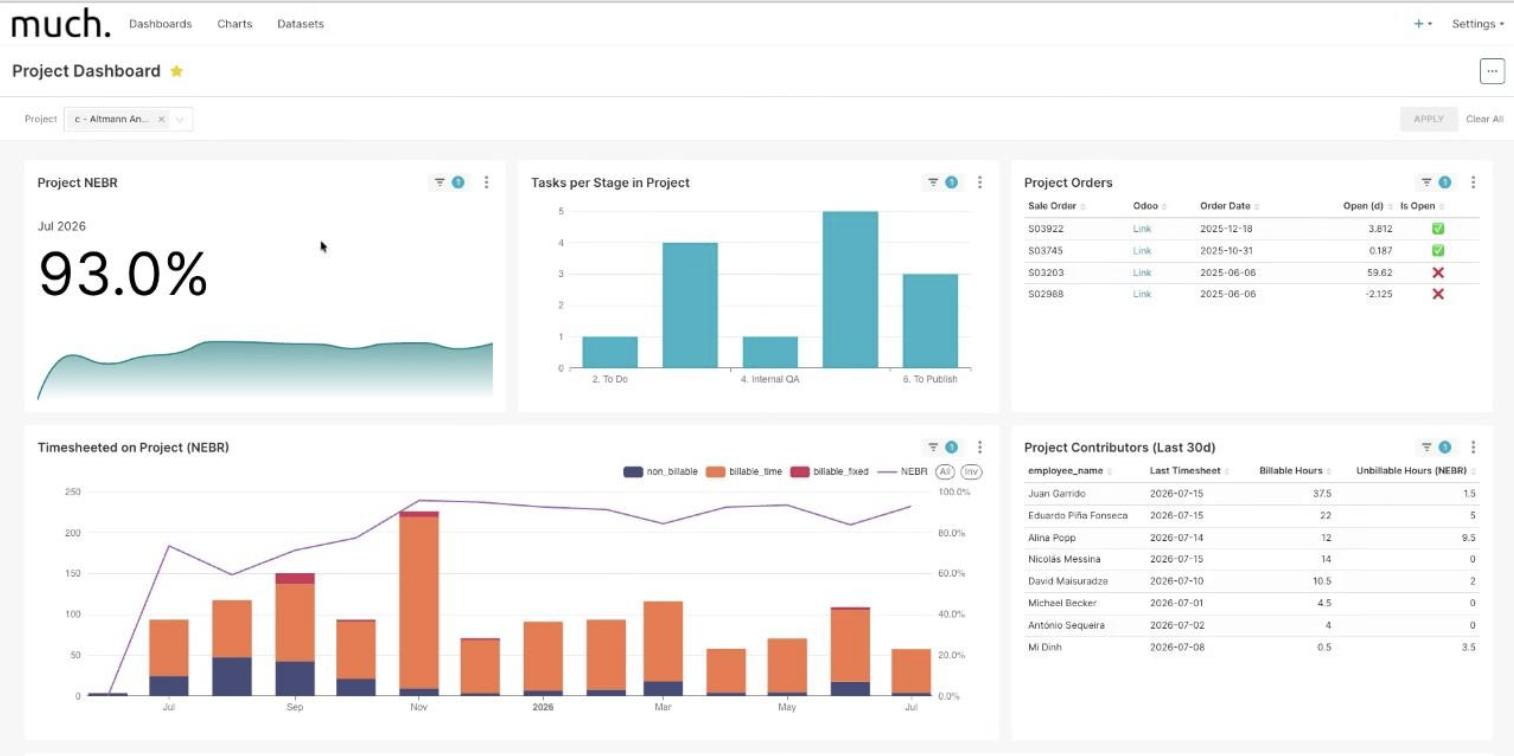
Superset is the internal BI tool used for project performance reporting. As a standard consultant, the main metric you will encounter here is the billable rate — the percentage of your logged hours that are billable. Project managers use Superset dashboards to assess whether a project is on track against its targets.
⚠️ Common Pitfalls
- Logging "research" or "bug fixing" in timesheets — These descriptions raise customer questions and signal that you were figuring things out at their expense. Use "Configuration analysis" or "Resolve issue: [description]" instead.
- Mentioning AI tools in descriptions — Some customers dispute billing for AI-assisted work. Describe the outcome (configuration, analysis), not the tool.
- Waiting until Friday to log the whole week — Memory is unreliable. Log at least twice daily. An inaccurate timesheet is worse than a messy one — inaccurate ones get disputed.
- Skipping the task link — Entries without a linked task cannot be properly tracked against budget or sprint scope. Always link to the correct task.
- Exceeding training budget without prior discussion — Any training or development request above 1,000 € requires a manager conversation before submission. Submitting first creates awkward situations.
- Booking a personal car trip without approval — Liability risk if the combined driving + on-site time exceeds 10 hours. Always get written approval first.
- Raising salary or workload topics outside appraisals — These discussions should happen in the formal quarterly appraisal cycle, not in informal conversations. Use the Feedback app to prepare and track them.
💡 Tips
- Set up a personal filter in Timesheets → My Timesheets grouped by Billing Type — gives you a live view of your billable vs. non-billable split for the month.
- Save every project's database URL and admin credentials to 1Password as soon as you get a new project. Your colleague will thank you when you are on vacation.
- Use Claudioo to help rephrase timesheet descriptions before EoM — paste a draft entry and ask it to suggest a more professional version.
- When checking budget health in Sales, look at Delivered vs. Invoiced on the sale order line — if delivered is close to the ordered quantity, flag it to your team lead immediately. The earlier you catch it, the more time you have to prepare the upsell conversation.
- The Knowledge Base is searchable in English and German — try both if the first search returns nothing.
- Internal stand-ups and recurring communication can be grouped: log them as a single entry "Team communication and coordination" once per day rather than per individual message or meeting.